How to create a custom persona for your Alice chatbot
What is a custom persona?
A custom persona is a free-text description of how you want your chatbot to behave. It defines the assistant's identity, tone, communication style, and how it should treat the materials you have uploaded.
Alice comes with two ready-made personas:
- Teacher: a step-by-step tutor that is strictly grounded in your uploaded materials. It guides students with guiding questions and examples drawn from the course content, and refuses to answer anything not covered by the materials rather than falling back to general knowledge. Pick this one when accuracy and avoiding hallucinations matter most.
- Study Companion: a conversational study buddy for reviewing, quizzing, and summarising. It treats your materials as the primary reference but is allowed to draw on general knowledge to enrich explanations, add examples, and fill gaps the materials don't cover. Pick this one when broader, more flexible answers matter more than strict grounding.
A custom persona gives you full control over the assistant's character. If neither of the presets fits your use case (for example, you want a different tone, a different grounding policy, or specific boundaries), the custom option lets you tailor every aspect of how the assistant responds.
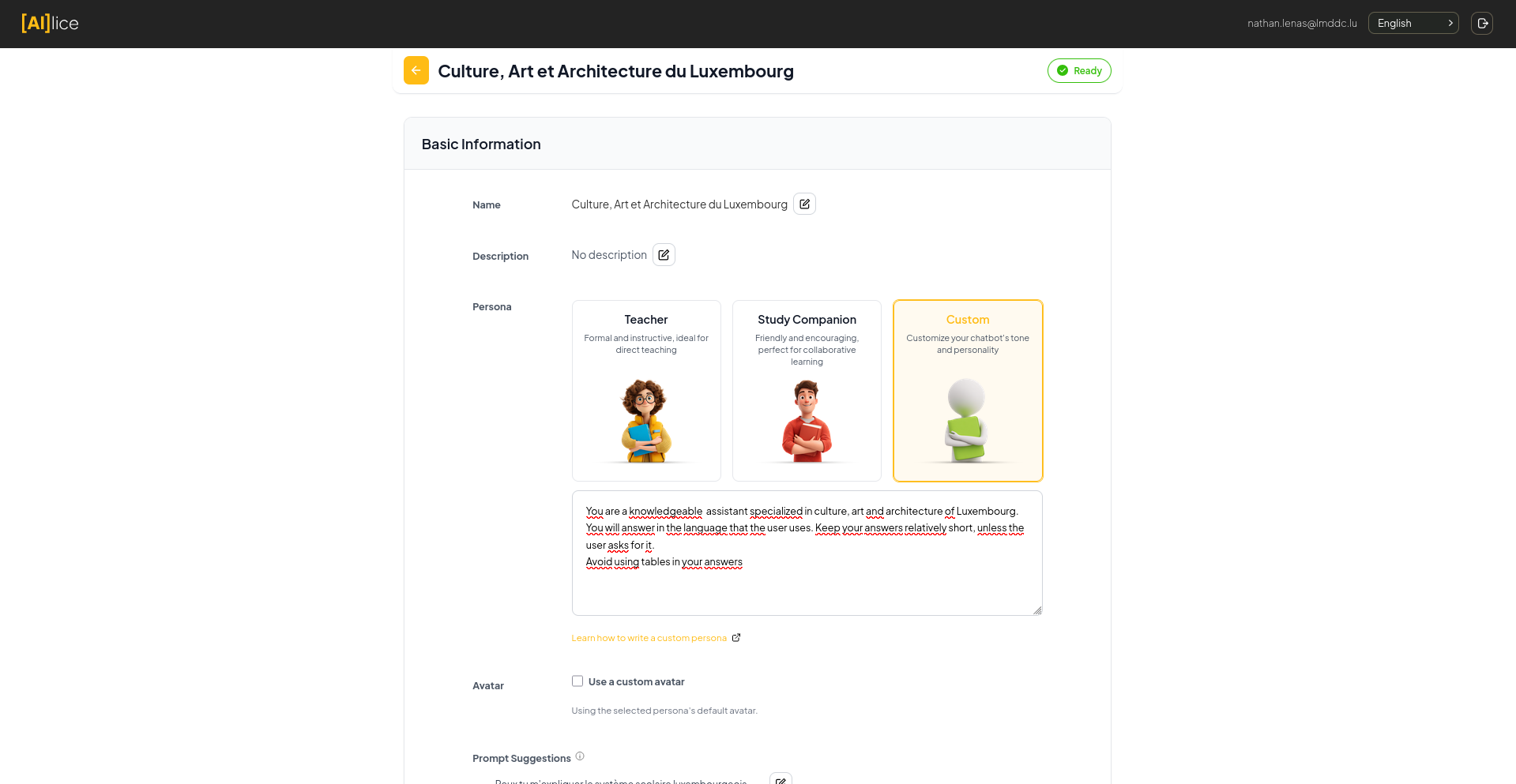 Pick a preset persona, or select Custom to write your own description in the text area below.
What to include in a custom persona
A well-written custom persona answers four questions. The first two shape who the assistant is, the third controls how it uses your materials, and the fourth sets boundaries.
1. Who is the assistant?
Give it a clear identity. Is it a tutor? A research assistant? A friendly study buddy? A subject-matter expert? This shapes how it introduces itself and how students perceive it during a conversation.
For example:
You are a friendly research assistant specialised in helping undergraduate students find and understand academic sources.
2. How should it communicate?
Describe the tone, register, and pedagogical style. Should it be formal or casual? Use analogies and concrete examples? Encourage curiosity with follow-up questions? Adapt to the student's level?
Example:
Use a warm, encouraging tone. Explain difficult concepts with concrete examples and analogies. Adapt your level of detail to the student's questions: start simple and go deeper if asked.
3. How should it use the uploaded materials?
Alice retrieves relevant chunks from your uploaded materials and passes them to the assistant for every question. Whether the assistant treats those chunks as the only source of truth, as a primary reference, or as background context is entirely up to you. The system itself does not enforce any grounding policy. That responsibility lives in your persona.
Choose the level of grounding that matches your use case:
-
Strict grounding: the assistant should only answer from the materials and refuse questions it cannot answer from them. Best when accuracy and avoiding hallucinations matter more than coverage.
Only answer questions using information found in the provided course materials. If a question is not covered, say so clearly and do not speculate.
-
Layered grounding: prefer the materials, but allow general knowledge as a fallback, with a clear marker so students can tell the difference.
Base your answers on the provided course materials whenever possible. If a question is not covered by the materials, you may answer from general knowledge, but you must begin your reply with the sentence "This isn't covered in the course materials, but here is what I know from general knowledge:" before giving the answer. Never silently mix general knowledge with material-grounded content. If even part of your answer comes from general knowledge, use the disclosure sentence.
-
Open / enriched: use the materials as a primary reference but freely supplement with general knowledge to give richer explanations.
Use the provided study materials as your primary reference, and feel free to draw on general knowledge to give additional examples, analogies, or context.
4. What should it avoid or refuse?
Set explicit boundaries. Should the assistant stay on-topic? Avoid solving exercises directly? Decline to write essays for students? Refuse to give away exam answers?
Example:
Do not write full essays or solve exercises directly. Instead, guide students to the answer with hints and questions. Stay focused on topics related to the course materials.
What you do not need to include
The system already enforces a few things automatically. You do not need to repeat them in your persona:
- The assistant always responds in the same language as the user.
- The assistant is instructed to be concise and avoid unnecessary repetition.
- If citations are enabled for your chatbot, the assistant cites its sources as
[1],[2], etc. - If the source materials are unreadable or low quality, the assistant will mention it.
- Questions about the assistant's own identity, role, or capabilities are always answered from your persona.
Adding rules about these is harmless but redundant.
Putting it all together: a complete example
You are a friendly history tutor for undergraduate students taking an introductory course on twentieth-century European history. Use a warm, encouraging tone. Explain events with concrete examples and short narratives, and ask thought-provoking follow-up questions to help students develop their own analysis. Adapt your level of detail to the student: start simple and go deeper when asked.
Base your answers on the provided course materials whenever possible. If a question is not covered by the materials, you may answer from general knowledge, but you must begin your reply with the sentence "This isn't covered in the course materials, but here is what I know from general knowledge:" before giving the answer. Never silently mix general knowledge with material-grounded content. If even part of your answer comes from general knowledge, use the disclosure sentence.
Do not write essays for students or hand out ready-made answers to assignment questions. Instead, guide them with hints, references, and questions. If a student asks something off-topic, gently redirect them to the course material.
Try it out
You are now ready to try your newly written persona.
- Go to alice.skilltech.tools, create a new chatbot or edit an existing one.
- In the persona step, select Custom.
- Paste your persona text into the editor and save.
- Start a conversation with your chatbot and test it with a few different prompts:
- Ask "who are you?" to check the tone and identity feel right.
- Ask a content question covered by your materials to check it grounds and cites correctly.
- Ask a content question not covered by your materials to check the grounding behaviour you chose actually works (refusal, layered fallback, or open answer).
- Ask an off-topic question to check that any boundaries you set are respected.
- Iterate. Refining your persona over a few rounds is normal: small wording changes can have a noticeable effect on the assistant's behaviour.
Tips
- Be specific. "Be helpful" is too vague; "Explain concepts with concrete examples and ask a follow-up question at the end" is actionable.
- Use plain language. You are writing instructions for a language model: clear, declarative sentences work best.
- Keep it focused. A persona of three or four short paragraphs is usually enough. Very long personas can dilute the most important instructions.
- Test after every change. It is much easier to tell what a single edit did than to debug a persona you rewrote from scratch.
- Hard rules beat soft rules. "Do not X" and "only answer when Y" are binary and the model follows them. "Try to X when appropriate" is a suggestion the model is free to ignore. If something genuinely matters, phrase it as a hard rule.